
I have exceeded the disk space limit of my hosting package.
Just before the disk space limit of your hosting package is exceeded, and when it actually is exceeded, you will receive an email about it. If no action is taken, your hosting account may be suspended and your site will then be unreachable. There are several ways to prevent this.
Free up disk space by deleting files.
One of the ways to solve this is to delete files you no longer need. You know best which files do and do not need to be kept in your hosting package, so it is a good idea to go through your file manager to find out which folders and files take up the most space. Files in the backups and application_backups folders can generally be deleted; our own servers also make daily backups that can be restored up to 30 days back. If there are files in the application_backups folder, you also need to switch off the backup function in Installatron, otherwise these files will keep coming back.
Order more disk space
If there are not enough files in your hosting package that you can delete to free up enough disk space, you can also choose to order extra disk space.
- To do this, log in at mijn.weboke.nl and go to My Products.
- Open the hosting package and choose the upgrade options. 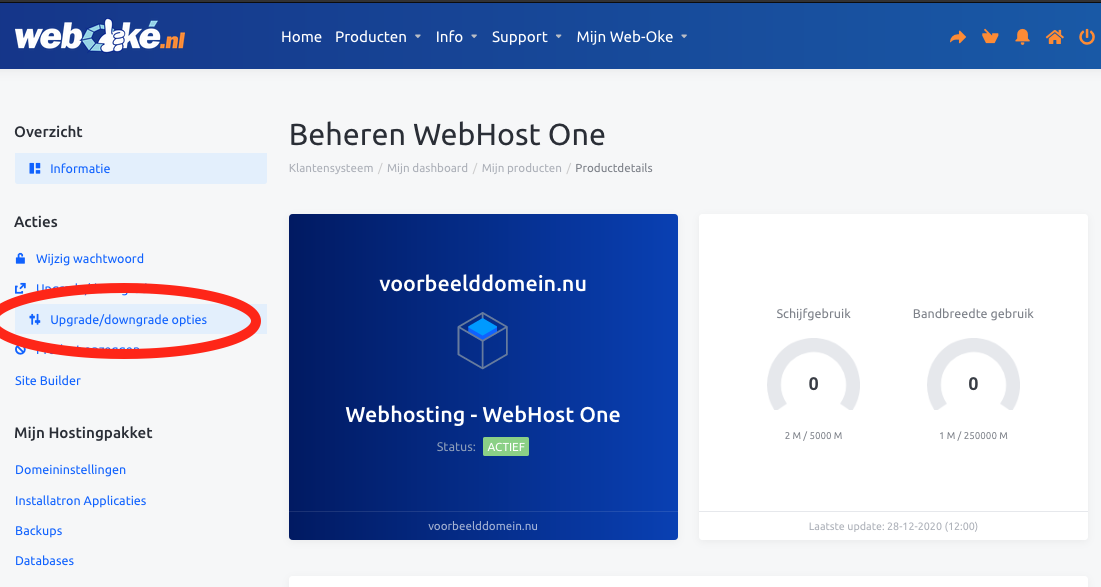
- On this page you can change the properties of your hosting package. 