
Chapter 4 · 4.5
Creating and deleting subdomains
Watch it in a short video
A subdomain is an address before your domain name, such as shop.yourdomain.com or test.yourdomain.com. You use it for a separate part of your website, a webshop, a test version or a second WordPress. You don't need to buy a new domain name for it. Your package lets you create many subdomains.
Creating a subdomain
- At the top right, use the domain selector to choose the domain the subdomain will belong to.
- In the menu, under Account Manager, click Subdomain Management.
- Click ADD SUBDOMAIN.
- Under Subdomain (1), type only the first part, for example shop. The domain name is already added after it.
- Under Document Root (2), choose which folder the files will go in. Leave it set to Default if you're not sure (see below).
- Click ADD SUBDOMAIN.

The subdomain now appears in the list. The Docroot column shows which folder the subdomain's files will go in.
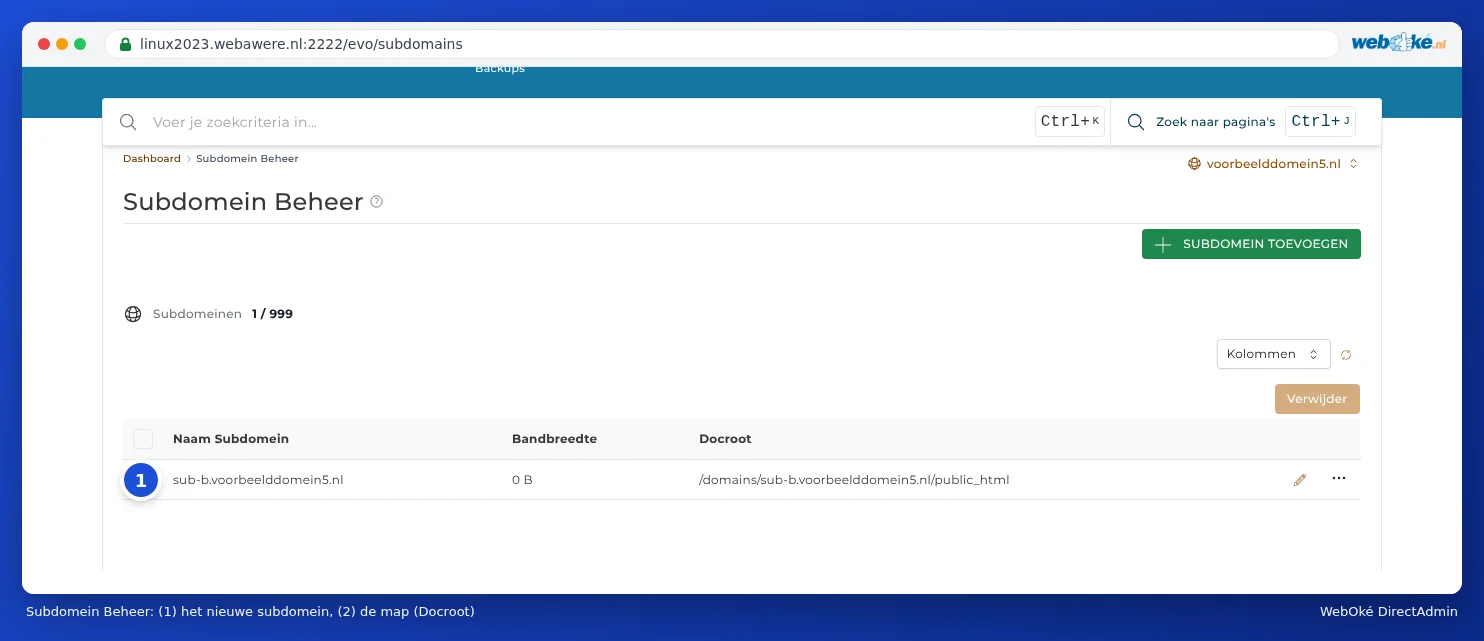
Where do I put the files?
This depends on what you choose under Document Root:
| Choice | Subdomain's folder | When? |
|---|---|---|
| Default | domains/shop.yourdomain.com/public_html: its own folder next to your main domain. | Almost always. The subdomain stays neatly separate from your main website. |
| Legacy (a sub-folder inside main domain) | domains/yourdomain.com/public_html/shop: a folder within your main domain's website. | If you're used to this from before. Please note: the content will then also be visible at yourdomain.com/shop. |
| Custom | A folder you choose yourself. | See A different folder for your website (document root). |
Everything you put in that folder appears at shop.yourdomain.com. You can see the folder in the list in the Docroot column.
You install WordPress or another application on a subdomain using Installatron: there, choose the subdomain under the domain (see Installing in a subfolder or on a subdomain).
When does the subdomain start working?
DirectAdmin adds the subdomain to the DNS straight away. Even so, it can take a while before it works everywhere, usually anywhere from a few minutes to an hour. It's best to wait at least ten minutes before opening the subdomain. If you tried it before it existed, your computer or internet provider will remember that it didn't exist. In that case, it can take longer, up to a few hours. You can read more about this waiting time in When does a change take effect? Waiting time and TTL.
Please note: Are you using nameservers from another provider, such as Cloudflare? Then you need to add the subdomain there yourself, as an A record or CNAME record. DirectAdmin only adds it to WebOké's DNS (see DNS in My WebOké and with external name servers such as Cloudflare).
Https on the subdomain
A subdomain also needs an SSL certificate. DirectAdmin requests one automatically as soon as the subdomain points to the server. If this doesn't work, see Certificate for www, subdomains and wildcard and Let's Encrypt not working: causes and solutions.
Deleting a subdomain
- Go to Subdomain Management.
- Tick the subdomain.
- Click Delete.
- Only tick Remove Directory Content if you also want to delete the subdomain's files.
- Click CONFIRM.

Tip: Not sure if you still need the files? Then leave them be. You can always delete the folder later in File Manager.
Frequently asked questions
Can I create several subdomains, each with its own WordPress?
Yes. Create a separate WordPress installation in Installatron for each subdomain, each with its own database.
Can I redirect a subdomain to another website?
Yes. If another provider (such as a webshop platform) asks you to point the subdomain to their server, don't create a subdomain in Subdomain Management. Instead, just create a CNAME record in DNS Administration (see CNAME records and the trailing dot). If you simply want to redirect visitors to another address, create the subdomain, select it in the domain selector, and set up a redirect using Site Redirects (see Site Redirects: forwarding a domain or page).
Does *.yourdomain.com (a wildcard) work?
You can't create a wildcard subdomain yourself in Subdomain Management. The A record with an asterisk is already included in your DNS by default. If you'd like all unknown subdomains to lead to your website, request this via a ticket.